
Did You Blow Up The Internet?
The content you were looking for couldn't be found. Try something else below!

Facebook Reviews: The Untapped Gold Mine for Local Social Proof
You finish a great job for a client, they thank you with a handshake, and you remind yourself to ask them for a Facebook review the moment you get back to your desk. By the time you sit down, three new client messages need attention, an employee is asking about tomorrow's schedule, and that review request gets pushed aside. A week later, you realize the link never got sent, and another satisfied customer moves on without leaving a trace of social proof.
Most business owners know positive Facebook reviews build credibility and bring in steady leads, but asking for them often feels like an awkward, manual chore. When collecting feedback requires you to pull up the customer's contact card, copy a direct link, and manually check whether they replied, the task gets buried under daily firefighting. The problem isn't that your customers don't want to help; it's that manual handoffs break down whenever your schedule fills up.
Do Facebook reviews help your business get found online?
Yes, Facebook reviews help your business get found online by improving local search visibility and establishing direct buyer trust. Search engines evaluate review frequency, profile activity, and customer sentiment across major social platforms to determine local authority. When potential buyers see consistent, positive recommendations on a company's Facebook Page, it confirms the business is active, reliable, and trusted by actual people in the local community.
Why Facebook Reviews Matter for Local Search Visibility

When potential customers search for a local service, Google doesn't rely solely on the reviews posted to your Google Business Profile. Search engines constantly scan major platforms across the web to verify whether your business is active, legitimate, and trusted by actual people in your community. Because Facebook has massive domain authority and verified user profiles, consistent feedback on your page acts as an independent signal that reinforces your overall local search presence.
How Search Engines Use Social Proof to Rank Local Businesses
Search engines evaluate consistency across your local citations, including your business name, address, phone number, and customer feedback. When buyers leave recommendations on your Facebook page, search algorithms connect that activity back to your primary website and map listings. If your Facebook page sits dormant with no recent activity or reviews, search engines have less confidence that your business is actively serving clients today.
Search algorithms also look at user engagement signals, such as review frequency and how quickly a business responds to customer comments. A steady stream of authentic feedback shows that real people interact with your brand on a weekly basis, rather than just once or twice a year. This ongoing validation helps protect your local rankings against competitors whose profiles remain inactive.
Why Prospects Check Facebook Before They Hire You
Prospective buyers rarely make a buying decision after looking at a single review site. Many prospects will find your business on Google, open a new tab to find your Facebook page, and scroll through recent posts to see how you treat your customers. Seeing real neighbors leave comments with their actual personal profiles removes skepticism in a way anonymous star ratings never can.
When prospects land on a page packed with recent recommendations, their hesitation disappears because the proof feels tangible and current. If they find an empty profile where the last post is from two years ago, they wonder if you're still in business and click over to your competitor instead. Keeping social proof up to date isn't just about search rankings; it directly protects your sales pipeline when interested leads check you out.
How to Ask Customers for Facebook Reviews (Without the Awkward Follow-Up)

Asking for a review face-to-face often feels uncomfortable, especially when you're wrapping up a project and trying to collect payment. Most business owners either skip the conversation entirely or send an awkward follow-up text three days later that gets ignored. You don't need to put on a high-pressure sales act to get honest feedback; you just need to ask at the exact moment your customer feels the most satisfied.
What is the best way to ask a customer for a Facebook review?
The best way to ask a customer for a Facebook review is to send a direct link via SMS or email immediately after completing a job. Customers are most willing to share feedback right when they experience great results. Providing a direct link that opens straight to the review submission page removes friction and makes leaving a recommendation take less than sixty seconds.
Timing Your Request for Maximum Response
Timing makes or breaks your review collection. If you ask a week after the job is finished, the customer's excitement has faded, and your message feels like an unexpected interruption. The best window to ask is within one to two hours of project completion or right after an invoice is paid. That way, the positive experience is fresh in their mind, and they're far more likely to take immediate action.
Removing Friction from the Review Process
Most customers who promise to leave a review don't back out because they're unhappy; they give up because the process takes too many steps. When you eliminate the barriers that stop customers from writing reviews, submission rates jump immediately. Sending a direct URL that lands them right on your recommendation prompt removes extra hurdles so they can leave feedback in two clicks.
Making the Request Sound Natural
You don't need formal scripts or corporate phrasing to ask for support. A short, genuine message that thanks the customer for their business and asks for a quick recommendation feels personal and respectful. When customers realize their feedback directly helps other local homeowners or business owners find trustworthy help, they are usually glad to leave a note.
Why Manual Review Requests Always Fall Through the Cracks
Every business owner starts the week with good intentions to follow up with recent clients and ask for feedback. You tell yourself you'll send three quick text messages before lunch, but then a supplier calls about a delayed order, a technician needs help on a job site, and an invoice dispute lands on your desk. By the end of the day, you've spent hours putting out fires instead of moving the business forward. The review requests you planned to send never happen, and another week passes without new social proof.
Why do businesses struggle to collect customer reviews consistently?
Businesses struggle to collect customer reviews consistently because the process relies on manual follow-up rather than automated operational triggers. When sending review links depends on an owner or employee remembering to text or email after finishing a job, daily operational fires take priority. Without a connected system that automatically requests feedback upon job completion, reviews slip through the cracks.
The Hidden Friction of Disconnected Tools
Collecting a simple review shouldn't feel like a chore, but it turns into one when your tools don't talk to each other. To send a single request, you have to dig up the customer's phone number from your billing app, jump over to Facebook to grab your review link, and paste both into a messaging thread. You're forced to act as the manual glue holding disconnected apps together, which drains your energy before you even write the message. When every single step requires manual effort, follow-up stops the moment your schedule fills up.
Why Blaming Your Team or Your Schedule Doesn't Fix the Problem
When reviews don't come in, it's easy to blame yourself or think your team just needs to try harder. You might tell your staff to mention Facebook at the end of every service call, but verbal reminders rarely stick when people are rushing to their next appointment. The breakdown isn't caused by a lack of effort or bad intentions; it happens because your operational setup has no way to move the next step forward on its own.
Relying on staff to manually connect the dots creates inconsistent results and leaves your online reputation to chance. Even the most dedicated employee will skip a manual checklist when three other urgent tasks compete for their attention. The only way to get dependable feedback every single week is to take the burden off your team's plate and let a connected process handle the timing for you.
How to Turn Customer Feedback into an Automated System
You don't need to hire another assistant or spend your evenings sending text messages to get regular Facebook reviews. The solution is to remove manual chasing from the equation entirely and let your operational setup trigger the request for you. When your follow-up happens automatically in the background, your review count grows every month while you focus on running your business.
How do you automate customer review requests?
To automate customer review requests, connect your customer database to an automated workflow triggered by job completion or payment processing. When an invoice marks as paid or a project status updates to complete, the system automatically sends a personalized SMS or email with a direct review link. This ensures consistent review collection without requiring manual daily follow-up from staff.
Triggering Review Requests at the Point of Delivery
The most reliable moment to collect feedback is right after you deliver great work. When your communication tools and project pipelines share the exact same system, a completed job status can immediately trigger a text message with your direct Facebook review link. Your customer receives the message while they're still admiring the finished work, which makes them far more likely to leave a positive recommendation on the spot.
If the customer doesn't respond to the first message, a connected workflow can send a polite follow-up reminder two days later. You don't have to write a reminder note on a desk pad or ask your team whether they followed up. The workflow manages the entire sequence automatically and shuts off the moment the customer takes action.
Connecting Reputation Management to Your Daily Operations
Treating review generation like an isolated marketing campaign usually fails because marketing tools don't know what's happening on your job sites. When your reputation tools exist on an island, someone still has to copy customer data from your invoices into a separate platform just to hit send. Connecting your reviews directly into your central operating system eliminates double data entry and keeps your customer records perfectly synchronized.
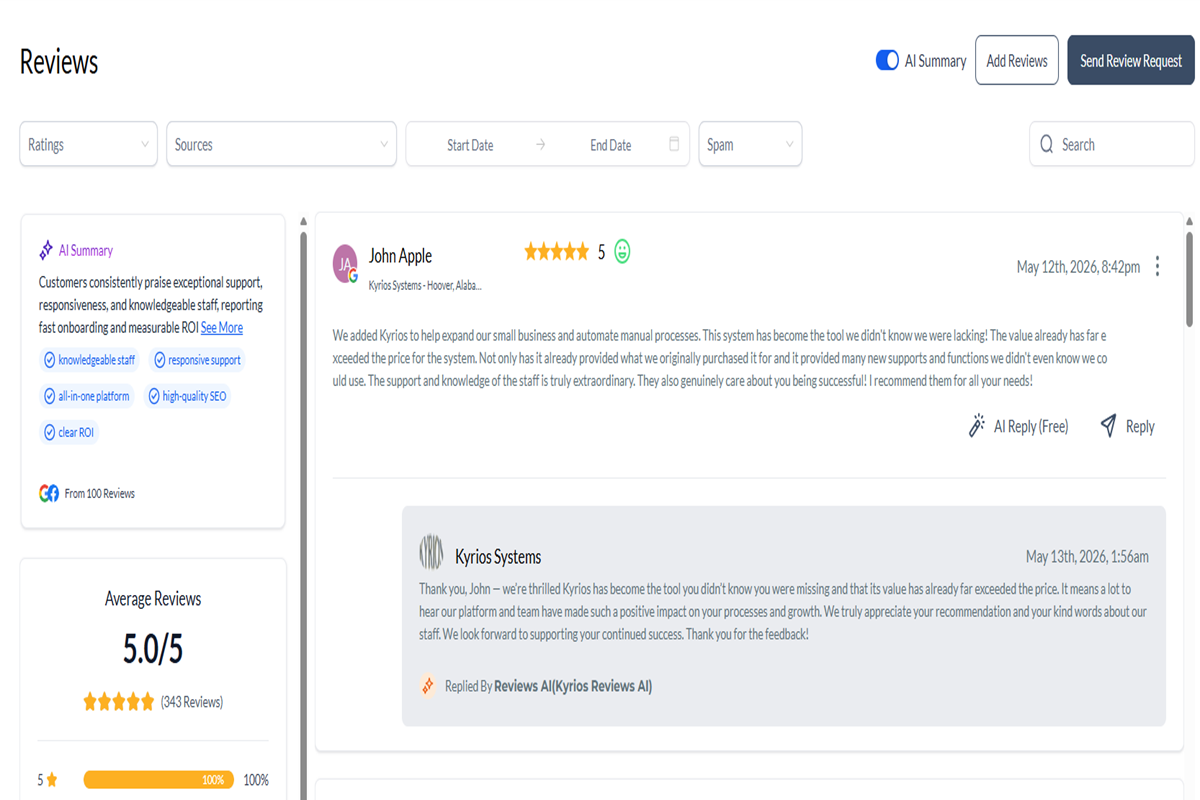
Moving Beyond Manual Chasing with Kyrios Systems
Your business doesn't struggle with social proof because you lack happy clients; it struggles because collecting reviews still relies on manual chasing across disconnected tools. When you handle all of this alone, important follow-up gets buried under daily firefighting. By anchoring your customer communications, task handoffs, and reputation workflows into one central infrastructure, your operations keep moving forward without everything landing back on your plate.
If you're ready to stop juggling multiple tabs and want to see how an integrated operating architecture coordinates your customer follow-up, explore our full system overview. See how connected pipelines and automated triggers take the friction out of your daily operations.
See How the Kyrios Operating System Works!

(205) 736-8422
1236 Blue Ridge Blvd,
Hoover, AL 35226

Company




Copyright Kyrios Systems 2026 - All Rights Reserved | Privacy Policy | Terms and Conditions
(205) 736-8422
1236 Blue Ridge Blvd,
Hoover, AL 35226



1236 Blue Ridge Blvd, Hoover, AL 35226
Download the Kyrios app now