

Calendar & Appointment Scheduling
When Someone Schedules, the System Starts Moving
Let customers schedule meetings, services, classes, or consultations directly into your system so bookings connect to your CRM, workflows, pipelines, payments, and reminders automatically.
When Scheduling a Meeting Turns Into a Process

Booking time with someone should be simple.
But in many businesses it looks like this:
A prospect fills out a form.
You send an email asking when they’re available.
They reply two days later.
You suggest a few options.
None of them work.
A simple meeting stretches across several messages before it finally lands on the calendar. And once the meeting is booked, the rest of the work begins.
Someone has to log the contact.
Someone has to remember to send reminders.
Someone has to update the CRM afterward.
The meeting itself isn’t the problem. It’s everything surrounding it.

Where Scheduling Friction Shows Up in Real Businesses

Scheduling problems happen in different ways depending on the type of business.
Sales teams lose momentum when prospects wait days to coordinate a demo.
Service businesses struggle with no-shows when reminders are inconsistent.
Agencies waste time distributing calls manually between team members.
Course creators manage registrations separately from the systems that track their audience.
Teams double-book shared rooms or equipment because availability isn’t visible.
Each issue looks small on its own. But together they create a surprising amount of friction.
Scheduling becomes something someone has to constantly manage instead of something the system handles.
Why Scheduling Breaks as Activity Increases

Manually scheduling appointments can work ok when your calendar is clear.
A few meetings per week.
One person handling bookings.
Low inbound demand.
At that scale, coordinating through email feels manageable.
But once activity increases, the cracks appear.
Response time slows because booking requires human coordination.
Double bookings happen when calendars are not synchronized.
No-shows increase when reminders depend on someone remembering to send them.
Meeting outcomes disappear because appointments are not tied to contacts, pipelines, or follow-up processes.
The issue is that scheduling happens outside the system that runs the rest of the business.

What Calendar Scheduling Is
Calendar Scheduling inside Kyrios allows customers, prospects, or team members to book time directly into the system based on the availability you define.
But the real difference is what happens after someone books. Appointments don’t simply appear on a calendar. They become part of the operational flow of the business.
A booking can automatically:
create or update a contact record
trigger reminders and confirmations
assign tasks to team members
start a follow-up workflow
move opportunities in the pipeline
collect payments for services or consultations
The meeting is no longer just a calendar event. It becomes an operational trigger that makes things happen automatically for the business.
Different Scheduling Structures for Different Situations
Kyrios calendars support multiple booking structures so scheduling fits the way your business actually operates.
You can create calendars for:
1:1 Meetings
Personal calendars for consultations, demos, or discovery calls.
Round Robin Scheduling
Automatically distribute appointments across multiple team members so calls are shared evenly.
Collective Calendars
Schedule meetings where multiple hosts must be available at the same time, such as project kickoffs or interviews.
Class or Group Bookings
Allow many attendees to reserve seats for workshops, webinars, or training sessions.
Service Menu Booking
Let customers choose from multiple services when scheduling an appointment.
Resource Scheduling
Track shared rooms, equipment, or facilities so multiple people can coordinate availability.
Instead of forcing every meeting into the same structure, scheduling adapts to how the business operates.
Collect Payments When Appointments Are Booked
For many businesses, scheduling is directly tied to revenue. Kyrios calendars allow payments
to be collected during the booking process.
You can require:
full payment at booking
deposits for appointments
payment for classes or workshops
Payments connect directly to Kyrios Payments so transactions stay linked to the customer record and appointment history.
This reduces no-shows and removes the need to collect payment separately.
AI Can Schedule Meetings Automatically
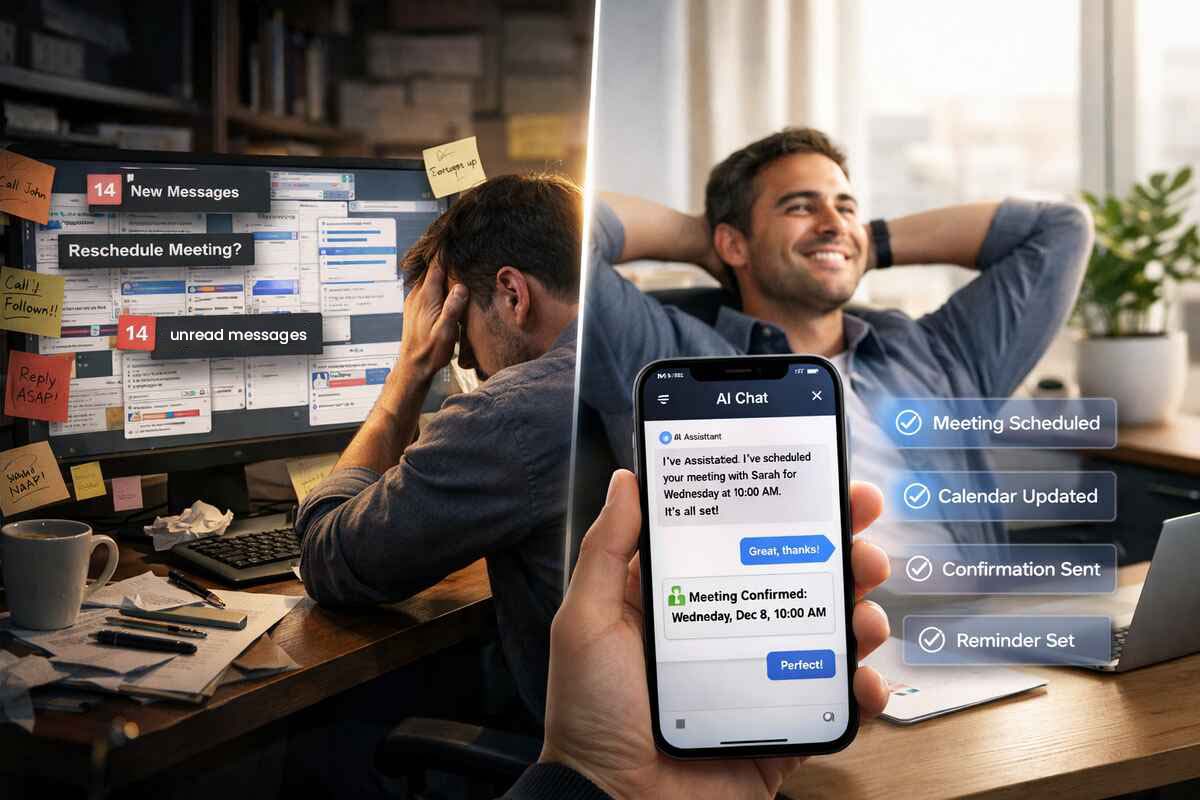
Kyrios AI Agents can manage scheduling conversations on your behalf.
Instead of sending booking links manually, AI can:
book appointments through chat or SMS
reschedule meetings automatically
cancel appointments when needed
send confirmations and reminders
Clients can change appointments without waiting for someone on your team to respond. Scheduling becomes available around the clock without adding more hands-on coordination.
How Scheduling Connects to the Rest of Kyrios
Calendar Scheduling works alongside several other parts of the platform.
When an appointment is booked, Kyrios can automatically update the CRM with the contact’s information and meeting details.
Workflows can send reminders before the meeting and follow-ups afterward.
Pipelines can update based on the outcome of a call or consultation.
Payments collected during booking stay attached to the appointment record.
AI agents can communicate with clients about scheduling changes.
All communication related to the appointment can appear in the Unified Inbox.
Instead of scheduling in isolation, it becomes connected to the entire business ecosystem.
What Changes Once Scheduling Is Structured
When scheduling connects directly to your CRM, workflows, and communication tools, several things shift.
Customers can book time instantly without waiting for email coordination.
Availability becomes clear across individuals and teams.
Reminders reduce missed appointments.
Meetings stay connected to the contact record and pipeline activity.
Follow-up happens automatically instead of relying on memory.
Scheduling stops being something someone has to manually deal with. It becomes a structured part of how the business operates.

Scheduling Is Often the First Step in a Workflow
In many businesses, scheduling marks the moment when interest becomes a real conversation.
A prospect books a demo.
A client schedules a consultation.
A student reserves a seat in a workshop.
Once that happens, the rest of the process begins. By connecting scheduling directly to your CRM, workflows, and communication tools, Kyrios ensures that the next steps happen automatically instead of depending on someone remembering what to do. The meeting is simply the beginning of the system moving forward.
Turn Your Calendar Into a System
Calendar Scheduling keeps appointments connected to your contacts, workflows, payments, and follow-up so scheduling becomes part of the system that moves your business forward.
(205) 736-8422
1236 Blue Ridge Blvd,
Hoover, AL 35226




Copyright Kyrios Systems 2026 - All Rights Reserved | Privacy Policy | Terms and Conditions
(205) 736-8422
1236 Blue Ridge Blvd,
Hoover, AL 35226

Company


Copyright Kyrios Systems 2026 - All Rights Reserved | Privacy Policy | Terms and Conditions
1236 Blue Ridge Blvd, Hoover, AL 35226
Download the Kyrios app now