
Forms & Surveys
Forms Should Trigger Work, Not Sit in Inbox
Create forms, surveys, and quizzes that capture structured information and store it directly inside your CRM so submissions automatically update contacts, trigger workflows, assign tasks, and move leads forward without manual tracking.
When Someone Submits Something… and Nothing Happens
Most businesses already use forms.
Contact forms
Quote requests
Onboarding questionnaires
Customer surveys
But the moment after someone clicks Submit is where things often break.
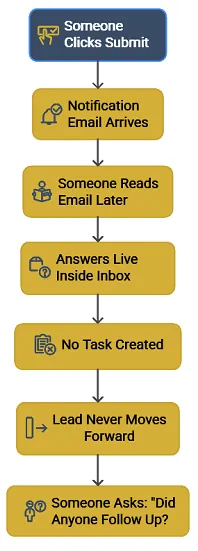
A notification email arrives. → Someone reads it later. → The answers live inside an inbox. → No task gets created. → The lead never moves forward.
A day later someone asks: “Did anyone follow up with that form submission?”
The problem isn’t collecting the information. It’s what happens after the information arrives.
Where This Shows Up
This gap appears in many everyday situations.
A prospect fills out a quote request form. The notification lands in someone’s inbox, but the contact never makes it into the pipeline.
A new client completes an onboarding questionnaire. Their answers sit in a spreadsheet or email thread while your team keeps asking the same questions again.
A customer satisfaction survey comes in. Responses arrive, but nothing triggers from them. No task. No alert. No follow-up call.
At low volume, you can usually handle it. But as volume increases, the work around them grows too.
You check inboxes
You forward emails
You copy answers into notes
You remind your team to respond
This is the work that eats up your day.
Why This Problem Appears as Businesses Grow

When you receive a few submissions each week, tracking this stuff manually feels manageable.
You can open the email and respond quickly. But when submissions start arriving across multiple forms or sites, the cracks appear.
Leads wait because no task was created.
Responses sit unread because notifications get buried.
Follow-up depends on memory instead of a defined process.
You might assume the issue is team discipline. In most cases, the issue is structure.
Forms capture information, but nothing in the system is responsible for moving the work forward. And when response time stretches from minutes to hours or even days, opportunities quietly slip away.
What Forms & Surveys Do Inside Kyrios
Forms & Surveys inside Kyrios provide a structured way to capture information and connect it directly to your CRM and workflows.
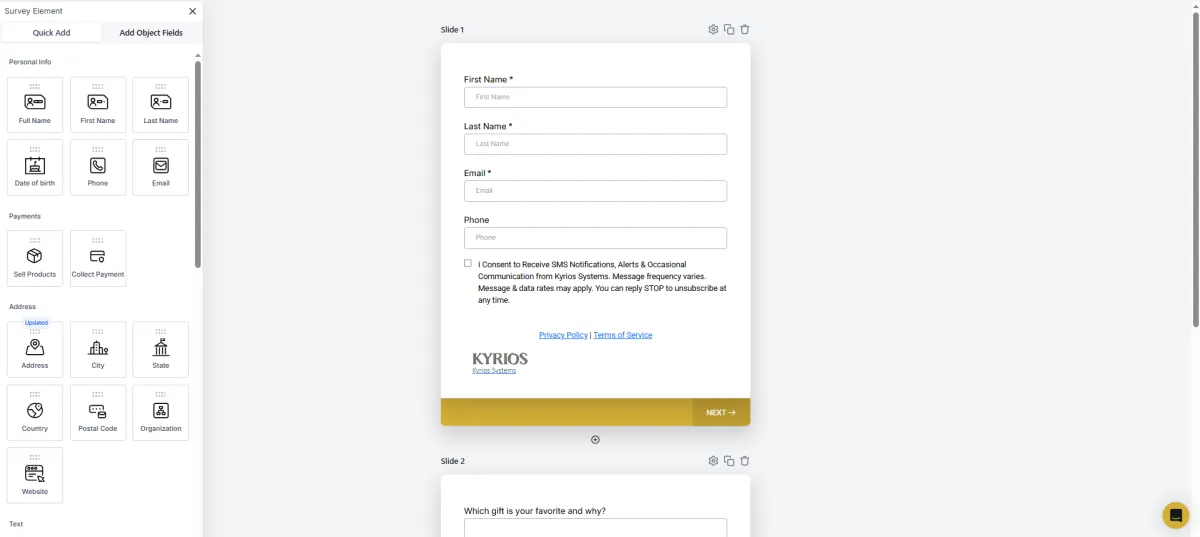
You can create:
lead capture forms
quote request forms
onboarding questionnaires
customer feedback surveys
quizzes or qualification forms
Each submission becomes part of the contact’s record instead of living in a separate inbox.
When someone fills out a form:
A contact record is created or updated.
Their responses attach directly to the contact timeline.
Tags can be applied automatically.
Workflows can trigger immediately.
The information becomes part of the system that runs your business.
Real Examples of How Businesses Use It

Forms & Surveys support many different operational needs:
A service company may use a quote request form to collect project details before the first call.
A consulting firm might send an onboarding questionnaire so the team understands the client before kickoff.
A marketing team may run a feedback survey to learn which services customers value most.
A support team could use forms to gather detailed requests before assigning work internally.
Instead of gathering information and sorting it later, the system organizes the responses immediately. That context stays attached to the contact record so the entire team can see it.
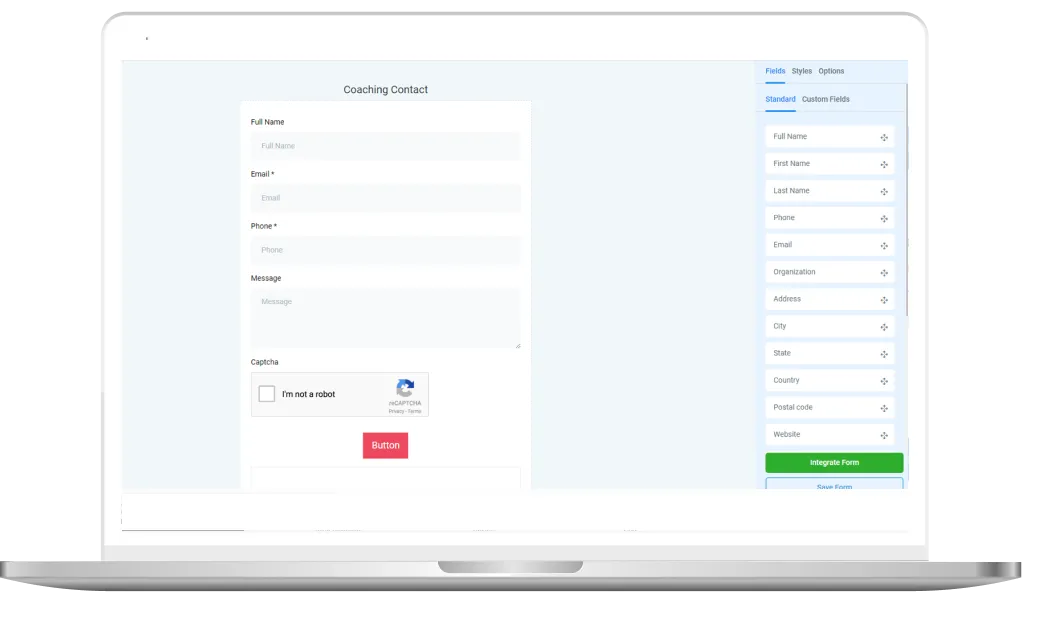
How It Works In Kyrios
Forms and surveys are created using a visual builder.
You can add fields such as:
name, email, and phone
custom questions
dropdown selections
multiple choice responses
file uploads
signatures
conditional logic based on answers
Once it is published, it can appear on a website page, funnel page, or shared link.
When a submission arrives, Kyrios can automatically:
A contact record is created or updated.
Their responses attach directly to the contact timeline.
Tags can be applied automatically.
Workflows can trigger immediately.
These actions are handled through the same workflow system that runs other parts of the platform. So instead of someone manually pushing it through or dealing with it, the system handles it immediately.
How Forms Connect to the Rest of the Platform
Forms are often the starting point of activity inside the system.
The information captured connects directly to the rest of Kyrios:
In the CRM
Form responses appear inside the contact timeline so your team sees the full context of the conversation.
In Pipelines
Submissions can move leads directly into the correct stage.
In Workflows
Responses can trigger follow-up messages, internal tasks, or onboarding sequences.
In Reporting
Responses can be reviewed across submissions to identify patterns and trends.
The form becomes part of the operational flow instead of a standalone tool.
What Changes Once Submissions Trigger the System

When form submissions connect directly to your CRM and workflows, a few things shift.
You stop checking inboxes to see who responded.
Your team stops asking if someone followed up.
Leads move into the pipeline automatically.
Tasks appear the moment submissions arrive.
Context stays attached to the contact record instead of living in scattered emails.
The information your business collects finally starts doing something.
And that removes a surprising amount of mental overload.
Forms & Surveys help capture information and move it directly into the workflows that keep your business moving forward.
(205) 736-8422
1236 Blue Ridge Blvd,
Hoover, AL 35226




Copyright Kyrios Systems 2026 - All Rights Reserved | Privacy Policy | Terms and Conditions

1236 Blue Ridge Blvd, Hoover, AL 35226
Download the Kyrios app now
(205) 736-8422
1236 Blue Ridge Blvd,
Hoover, AL 35226

Company


