
Team & Hand-off System
Stop Acting as the Middleman Between Team Members
Growing your business shouldn't mean spending your day forwarding messages, checking who owns a task, and jumping between tabs to keep projects moving. Kyrios gives your company one connected system where team handoffs, task assignments, and next steps happen automatically—so work doesn't stall when you step away.
A project moves from sales to project setup. A client calls with a quick question. Someone on your team says, "I thought they handled that."
And suddenly you’re stuck right back in the middle:
You’re checking messaging apps.
You’re opening the CRM tab.
You’re asking, “Who’s handling this?"
You didn’t build a business just to act as the traffic controller for every handoff. But here you are, piecing together what got done and what got missed. You catch yourself thinking, "If I don't double-check this, it's going to fall through the cracks."
What Handoff Friction Looks Like Day-to-Day

Handoff breakdowns usually show up as small daily breaks across disconnected apps that compound over time:
A deal closes, but project details stay trapped in a sales rep's email inbox, so the client has to repeat their answers to the fulfillment team for the third time.
A customer message arrives: Two team members assume someone else responded, so the inquiry sits unanswered in a silent inbox.
A task gets marked complete, but no next step was assigned, so the project just floats with no clear owner.
You walk past a team member and ask, "Did that quote go out?" They say, "I thought it was waiting on your approval." You open three different tabs to figure out what happened.
There is no clear record of who had the task last, no visible next step, and no clean transition between team members. So you step in again and say, "I'll just handle it." That one sentence has probably cost you more hours than you want to admit.
Why Does It Keep Falling Back On You?
When your software tools cannot pass work forward automatically, every open task floats upward to your desk:
Approvals get sent to you "just to be safe."
Questions land in your inbox because "you'll know the answer."
Team members pause instead of moving to the next step.

Someone finishes their part of a project, but because the next step isn't assigned, they wait. They ask you, or they assume someone else has it.
This is a Systems Breakage: your tools hold notes and task lists, but they are isolated from each other and can't assign the next step automatically. When a process feels unclear across separate apps, work naturally lands back on the owner. You become the safety net—not because your team isn't working hard, but because your tools cannot move work without you.
What Team Handoffs Should Look Like

Work should transition smoothly from one person to the next without your intervention:
When a deal closes: The onboarding task is assigned to the fulfillment team instantly.
When a task finishes: The system triggers the exact next step for the next person in line.
When a client reaches out: The message routes directly to the right person with the full conversation history visible.
You don't have to chase updates or jump between tabs. You open one dashboard and see project status across your entire company.
Fewer interruptions. Fewer "just checking" messages. Zero hovering. The work gets done, and you stop acting as the glue holding every department together.
How the Team & Handoff System Works
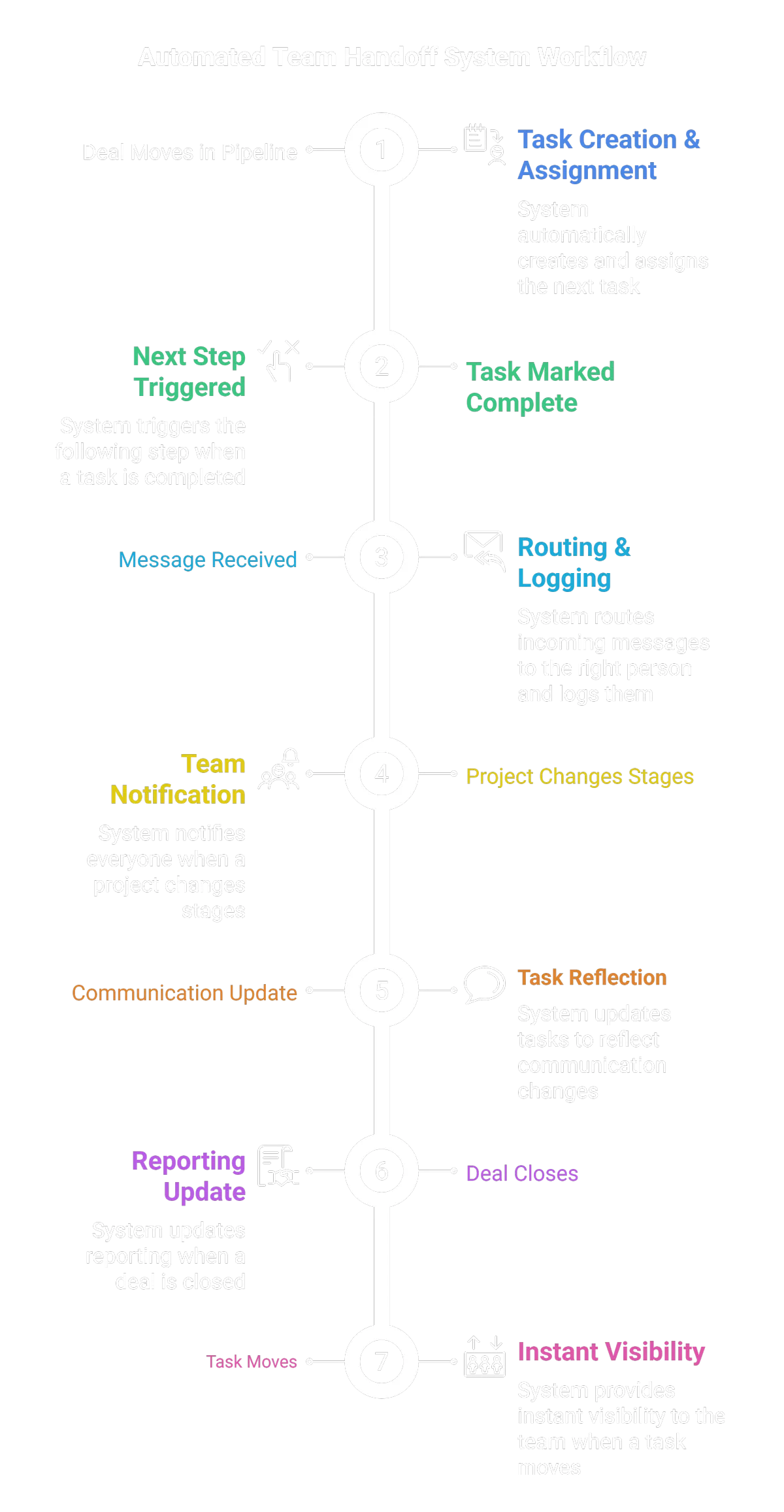
In Kyrios, when an event happens, the system can define the next step automatically:
When a deal moves forward, a new task is generated and assigned to the right team member instantly.
When a task is completed, the next step in the process kicks off without manual handoffs.
When a client sends a message, it routes to the assigned team member and attaches directly to the customer profile.
When a project stage updates, the entire team sees the change in real time.
Work doesn't wait for someone to send an email or tell someone else to handle it.
The system handles:
Task assignments and single-role ownership
Real-time status updates
Internal notifications and manager alerts
Pipeline transitions
Cross-department visibility
It connects messaging, tasks, and sales pipelines so internal transitions are crystal clear. You stop acting as the default messenger between your own team members.
Kyrios Tools That Power This System
These aren’t random tools. They work together to prevent stuff from circling back to you.
Task Manager
Task Manager creates, assigns, and tracks tasks tied to contacts, deals, and projects. When someone completes their part, the next person sees what’s required without asking you. No more hallway reminders or sticky notes.
All-in-One Inbox (Unified Inbox)
The Unified Inbox pulls email, SMS, social messages, and chat into one conversation thread tied to the contact record Instead of messages scattered across apps, your team sees the full context before replying. Handoffs don’t require forwarding screenshots.
Workflows & Automations
Workflows create automatic task assignments, stage changes, and notifications when specific actions happen When a deal closes or a form is submitted, the system assigns the next steps instantly. No waiting for you to notice and push it forward.
Client Portal
Instead of your team answering the same status question three times, the information is already visible. That reduces internal back-and-forth.
Other Kyrios Tools That Support The Team & Hand-off System
Click any tool below to see how it connects into your handoff system:
How This Connects to the Rest of Kyrios
When handoffs are built into your system, execution stays aligned across your entire company:
Customer Replies: The contact record is updated and notifies the account owner automatically.
Deal Advances: Financial reporting and fulfillment tasks reflect the change immediately.
Task Completion: The next workflow step is initiated for the team.
This system works hand-in-hand with your Lead & Follow-Up, Workflow & Automation, and Visibility & Control systems. When communications, tasks, and pipelines share the same context, your team stops asking you to connect the dots.
Ready to Stop Being the Middleman?
You built a team so you wouldn't have to handle every operational transition yourself. See how the Kyrios Business Operating System makes task ownership clear and daily execution predictable.
(205) 736-8422
1236 Blue Ridge Blvd,
Hoover, AL 35226

Company





1236 Blue Ridge Blvd, Hoover, AL 35226
Download the Kyrios app now